Playing on Your Phone: What You're Actually Downloading
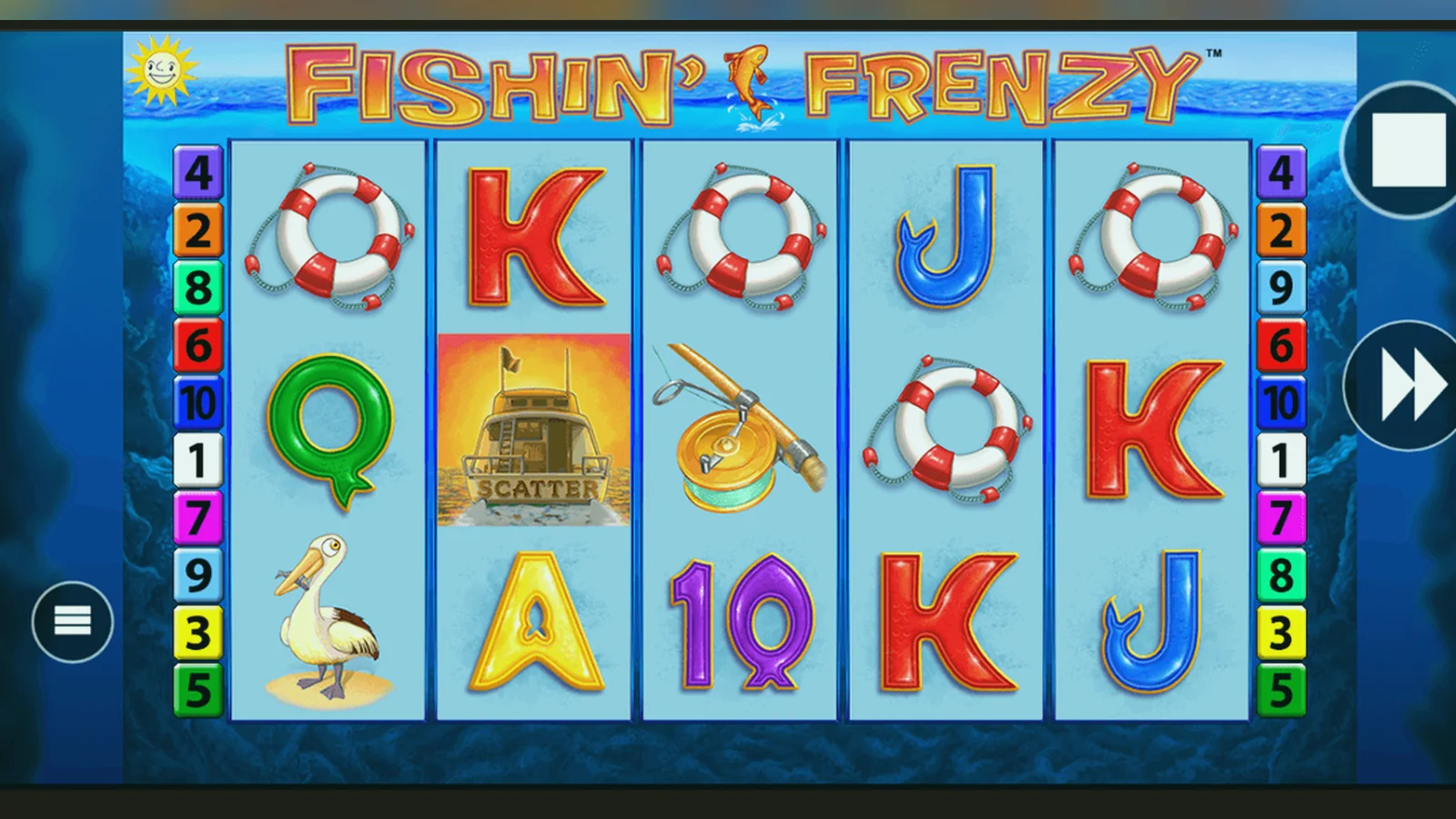
Blueprint's Fishin' Frenzy runs at 96.12% RTP across every version — desktop, browser, native app — so the choice of where you play it comes down to convenience and risk, not payout. Most UKGC-licensed operators serve the game through a mobile-optimised site rather than a standalone app, and that's usually the safest route.
The confusion starts when you search for «Fishin' Frenzy app» and find App Store listings, APK download sites, and operator-branded apps that all look legitimate. Some are. Many aren't. This page walks through what's real, what's cloned, and how to install the game without handing over more permissions than it needs.
What the Listing Actually Looks Like
If you find Fishin' Frenzy on the Play Store or App Store, it's wrapped inside an operator's casino app — Blueprint doesn't publish a standalone game. Here's what a legitimate listing shows:
Those numbers are illustrative, but the pattern holds: active operator apps are updated every few weeks, have ratings in the low 4s, and list the operator — not Blueprint — as the developer. If the developer name is generic («Slot Games Ltd»), the version hasn't changed in months, or the download count is suspiciously low for a well-known brand, it's likely a clone.
Four Ways to Install, and the Risk of Each
You can play Fishin' Frenzy on a phone through the mobile browser, a progressive web app, an operator's native app, or an APK from a third-party site. The last option carries the most risk; the first is the default on most UKGC-licensed platforms.
- Mobile browser: Open the casino site in Safari or Chrome, log in (or verify your age for demo play), find the game, and tap. No installation. The site uses responsive HTML5, so the interface scales to your screen. This is the path most operators push you towards, and it's the one with the smallest attack surface — you're not granting any extra permissions.
- Add to home screen (progressive web app): After you load the game in the browser, iOS and Android both let you save a shortcut to your home screen that opens the site in a chromeless window. On iOS: tap the share icon, scroll to «Add to Home Screen», name it. On Android: tap the three-dot menu, choose «Add to Home screen». It looks like an app but runs in the browser sandbox. No permissions beyond what the browser already has.
- Operator's native app (Play Store / App Store): Search for the casino's name, download the official app, log in, navigate to the game library. The app may ask for location (to confirm you're in the UK), notifications (for bonus alerts), and camera (for document upload during KYC). These are reasonable if the operator is UKGC-licensed and the request is tied to a specific feature. Decline anything else.
- APK from a third-party site: Some sites offer «Fishin' Frenzy APK download» files that bypass the Play Store. Android allows installation from unknown sources if you enable it in settings, but you're trusting the file's origin. APKs can bundle malware, request excessive permissions (contacts, SMS, call logs), or impersonate a legitimate app to harvest login credentials. Unless you have a specific reason to sideload — and you've verified the APK's signature with a tool like APK Analyzer — this route is not worth the convenience.
What Your Phone Actually Needs
Fishin' Frenzy is a five-reel video slot with modest graphical demands — no 3D rendering, no real-time multiplayer. The minimum specs reflect that:
- Android 6.0 (Marshmallow) or later; 2 GB of RAM; ~50 MB of free storage if you're installing an app, none if you're playing in the browser.
- iOS 12.4 or later (iPhone 6s onwards); similar RAM and storage requirements.
- A stable connection: the game streams assets and sends bet data to the server on every spin, so mobile data or Wi-Fi with at least 1 Mbps down is enough. If the connection drops mid-spin, the server records the result and shows it when you reconnect — you won't lose the bet.
Older phones (iPhone 6, Galaxy S6) can run the game but may stutter during the free-spins sequence when multiple fish symbols animate at once. The browser version is often lighter than a native app because it doesn't cache a full game library.
The Interface Across Five Inches
Blueprint adapted the desktop layout to portrait orientation, so the reel grid sits in the upper two-thirds of the screen, the bet controls below, and your balance in the top-left corner. Three key screens:
- Main game: Five reels, three rows, ten paylines marked by thin lines when you tap the paytable icon. The fisherman wild is a cartoonish figure holding a rod; the scatter is a fishing-boat graphic. Bet adjustment uses plus/minus buttons flanking the stake display, with a tap-and-hold menu for preset amounts (£0.10, £0.20, £0.50, £1.00, up to the £5.00 cap, or £2.00 if you're 18–24). The spin button is a large circle at the bottom-right; auto-play and turbo-spin toggles sit beside it.
- Free spins: When you land three or more scatters, the screen darkens, a banner announces the number of spins (10, 15, or 20), and the reels shift to show fish symbols with cash values. The fisherman appears on reel 5 and collects every fish in view, adding the amounts to your running total. The animation is brief — each collected fish flashes and disappears — and the spins continue until you run out or retrigger. The total win displays at the end, then you return to the base game.
- Paytable and settings: Swipe left or tap the menu icon (three horizontal lines) to open a sidebar with the paytable (a scrollable list of symbol values at your current stake), game rules (RTП, volatility, max win), sound toggles, and a link to your transaction history. The paytable updates when you change your bet, so a £1.00 spin shows different coin values than a £0.10 spin.
The layout is clean but not innovative — it's the same structure Microgaming and NetEnt settled on a decade ago. If you've played any modern slot on mobile, you'll recognise the pattern.
Version Updates and What Changed
Blueprint and the operator hosting the game both push updates, but they serve different purposes. Blueprint updates the game client (the HTML5 package that renders the reels and handles RNG calls); operators update the wrapper app (the casino interface that manages login, payments, and the game library).
Recent operator app updates (as of late 2026) focused on compliance changes tied to the UKGC's affordability-check rules: prompts appear when you approach £150 in net deposits over a month, asking you to confirm income via Open Banking or upload a bank statement. The game itself hasn't changed — it still runs at 96.12% RTP, with the same pay table and free-spins mechanic.
Blueprint's last update to Fishin' Frenzy addressed a Safari bug on iOS 16 where the auto-play counter wouldn't decrement correctly, causing the feature to continue past the selected number of spins. That patch rolled out in September 2026. If you're playing on iOS and still see the issue, clear your browser cache or reinstall the app.
Spotting a Fake and Dangerous Permissions
Clone apps and malicious APKs usually give themselves away through one of three tells: mismatched branding, excessive permissions, or a paytable that doesn't align with Blueprint's official numbers.
- Branding: The legitimate game uses Blueprint's logo in the splash screen and lists the operator's name in the app info. A clone might use a generic fish graphic, misspell «Fishin' Frenzy» (e.g., «Fishing Frenzy»), or credit a developer name you can't find in the UKGC register.
- Permissions: A real casino app asks for location (to enforce geo-blocks), camera (for KYC document scans), and notifications (for bonuses). It should never ask for access to your contacts, SMS, call logs, or microphone. If the permission list includes «read phone state» or «access accounts», decline and delete the app.
- Paytable drift: Open the paytable and check the RTP. Blueprint's Fishin' Frenzy is 96.12% in every licensed version. If the app claims 98% or lists a max win above 2,500× your stake, it's either a clone or a completely different game mislabelled to ride Blueprint's SEO.
Why Most Players Skip the App Entirely
The App Store and Play Store both allow UK casino apps from UKGC-licensed operators, so availability isn't the barrier. The barrier is that the browser version works well enough that downloading a 45 MB app feels redundant. You still need an internet connection to play (the game streams data on every spin, even in the app), and you still go through the same login and KYC checks. The app's main advantage is a home-screen icon and slightly faster load times if you play frequently.
For occasional players, the browser path is simpler: open the casino site in Safari or Chrome, verify your age, find Fishin' Frenzy in the slots library, and tap. No permissions to review, no storage used, no update notifications. The game runs in HTML5, so performance is identical to the app.
If you do choose to install, the operator's app gives you access to the full game library, including other Blueprint titles and live-dealer tables. But if Fishin' Frenzy is the only game you play, the browser version is the leaner option.
FAQ
Can I play Fishin' Frenzy for free without downloading anything?
Most UKGC-licensed sites let you try the demo in your browser after you log in and verify your age — no download, no deposit. Some operators restrict demo play to registered accounts to comply with age-check rules, so you'll need to create an account and confirm you're 18 or older. The demo uses the same RTP and mechanics as real-money play, but you can't cash out demo winnings.
Is it safe to download a Fishin' Frenzy APK from a third-party site?
No. APKs from file-sharing sites or forums bypass the Play Store's vetting process, so there's no guarantee the file hasn't been tampered with. Malicious APKs can request permissions the legitimate app doesn't need (contacts, SMS, call logs), install adware, or steal login credentials. If you want to play on Android, download the operator's app from the Play Store or play in your mobile browser. Sideloading an APK is only defensible if you've verified the file's signature with a tool like APK Analyzer and you have a specific reason to avoid the store.
Does the mobile app pay out the same as the desktop version?
Yes. Blueprint's Fishin' Frenzy runs at 96.12% RTP across every platform — desktop browser, mobile browser, iOS app, Android app. The RNG (random number generator) is the same, certified by an accredited testing lab, and the pay table doesn't change. The only difference is the interface layout: portrait orientation on mobile, landscape on desktop. If you see a version claiming a higher RTP, it's either a clone or a different game.
Why does the app ask for my location and camera?
Location access lets the operator confirm you're in the UK (UKGC-licensed sites can't serve players outside permitted jurisdictions). Camera access is for document uploads during the KYC (know-your-customer) check before your first withdrawal — you'll photograph your ID, passport, or driving licence. These are standard requests for a licensed casino app. If the app asks for contacts, SMS, call logs, or microphone, decline and delete it; those permissions aren't tied to any legitimate casino feature.